Elevator Service Software and QuickBooks: What to Sync
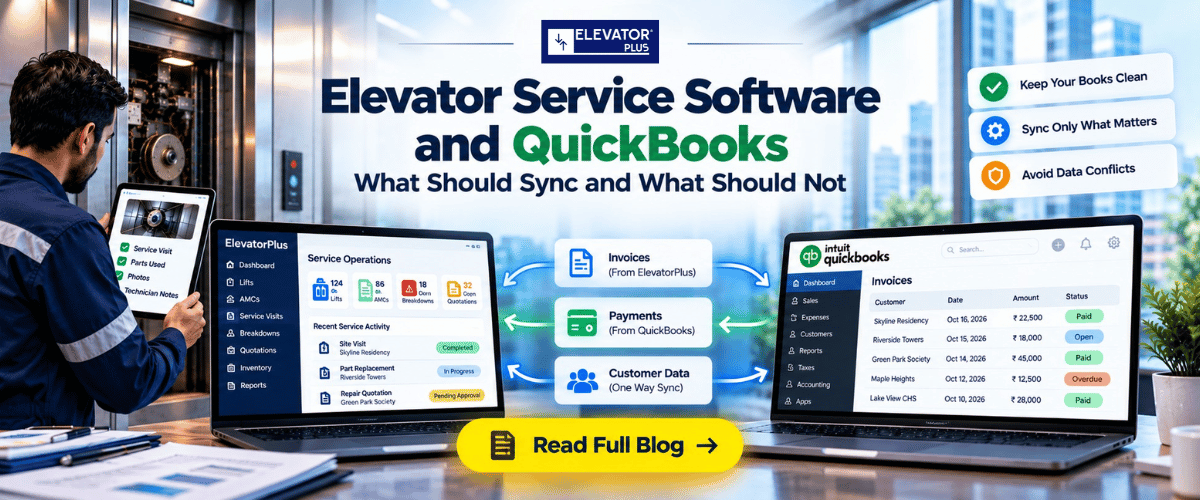
Elevator Service Software and QuickBooks: What Should Sync and What Should Not
By Mr. Sujit Katariya, ElevatorPlus · Compliance reviewed by Mr. Sumeet Katariya
In short: Elevator service software and QuickBooks should not hold the same records. Service software owns units, maintenance agreements, visits, callbacks and parts used. QuickBooks owns the books: posted invoices, payments, tax and the chart of accounts. Sync only what crosses that line, mostly one way, on a fixed schedule. Decide who builds the sync and who fixes it when it fails before you sign. That decision causes more migration trouble than any field mapping.
Key takeaways
- Each record needs one system of record. If a customer's billing address can be edited in both systems, it will eventually be different in both.
- Most records should sync one way. Billable events go from service software to QuickBooks. Payment status comes back. Very little else needs to move.
- Some records should never sync. Units, MCP checklists and callback history stay in service software. The chart of accounts and tax codes stay in QuickBooks.
- Who owns the sync matters more than who builds it. Someone has to watch for failed records, fix mappings when you add a new item, and answer when the totals disagree.
- Migrations break on customer matching. Duplicate names, buildings stored as jobs, and open invoices at cutover cause most of the cleanup work.
- QuickBooks Desktop and QuickBooks Online connect differently. Confirm which one the integration is built for before anyone starts.
What this guide covers: which records belong where · the sync table · one-way vs two-way · who builds and owns the sync · what breaks in a migration · questions to ask any vendor · FAQs
Where does elevator service software end and QuickBooks begin?
The line is simple to state. Service software runs the elevator business. QuickBooks keeps the books.
If you are moving off QuickBooks Desktop job tracking or a set of spreadsheets, you are probably using one tool for both today. That is why the first question is not "how do we sync?" It is "which system owns which record?" Answer that first and the sync almost designs itself.
If you are still deciding what the service side should cover, start with What Is Elevator Service Software? A Straight Answer.
| Belongs in service software | Belongs in QuickBooks |
|---|---|
| Buildings, units and their equipment details | Chart of accounts |
| Maintenance agreements, terms and billing schedules | Posted invoices and credit memos |
| Maintenance visits, MCP checklists and results | Payments received and deposits |
| Callbacks, entrapments and response times | Sales tax setup and tax codes |
| Quotes for repairs and modernization | Vendor bills and accounts payable |
| Parts used on each job | Financial statements |
| Technician attendance, overtime and approved expenses | Bank reconciliation |
ElevatorPlus is not an accounting platform, and it is not trying to be. It records the operational side and passes what the books need to whichever accounting system you already run.
The sync table: record, system of record, direction, frequency
This is the table to agree with whoever builds your integration. Fill in the last column with a name.
| Record | System of record | Direction | Frequency | Owner |
|---|---|---|---|---|
| Customer (billing entity) | Service software, where new customers start | Service software to QuickBooks | On create and on change | |
| Buildings and units | Service software | No sync | Not applicable | |
| Maintenance agreement terms | Service software | No sync | Not applicable | |
| Billable event: agreement billing period, billable callback, accepted repair quote | Service software | Service software to QuickBooks, as an invoice | On event, or a daily batch | |
| Posted invoice number and status | QuickBooks | QuickBooks to service software | Daily | |
| Payment received | QuickBooks | QuickBooks to service software | Daily | |
| Credit memos and write-offs | QuickBooks | QuickBooks to service software, status only | Daily | |
| Parts and service items list | Choose one system and hold to it | One way only | On change | |
| Parts used on a job | Service software | Service software to QuickBooks, as invoice lines | With the billable event | |
| Technician attendance, leave, overtime and approved expenses | Service software | Service software to your payroll system | Each pay period | |
| Chart of accounts and tax codes | QuickBooks | No sync. Map once at setup | Review when they change | |
| Vendor bills | QuickBooks | No sync | Not applicable |
Two rows deserve a closer look.
Payment received. This is the record your office needs most and usually has least. When payment status comes back daily, the person scheduling a billable repair can see whether the building has paid its last three invoices. In ElevatorPlus, tracking receivables and payment reminders against each customer sits on the service side for exactly this reason.
Technician time. ElevatorPlus records attendance, leave, overtime and approved expenses, which feed whatever payroll system you already run. That may be inside QuickBooks or a separate provider. Either way, the time record starts where the technician works.
Should the sync be one-way or two-way?
One-way for almost everything. Two-way only for status fields.
A two-way sync means both systems can change the same record. That needs conflict rules: which edit wins, what happens when both change on the same day, and who is told. Without those rules, two-way sync produces duplicates and silent overwrites, and nobody notices until month-end.
A one-way sync is easier to reason about. The record is created and edited in one place. The other system receives a copy and does not change it. When something looks wrong, there is only one place to fix it.
| One-way | Two-way | |
|---|---|---|
| Where you edit | One system only | Either system |
| Conflict rules needed | No | Yes |
| Risk of duplicates | Low | Higher |
| Effort to build and test | Lower | Higher |
| Best for | Customers, billable events, parts used | Invoice and payment status |
If a vendor offers "full two-way sync" as a feature, ask which records it covers. Then ask what happens when the same field changes in both systems on the same day.
👉 Want to see which records stay in ElevatorPlus and which go to your books? See how ElevatorPlus connects to QuickBooks and Xero →
Who builds the sync, and who owns it?
These are two different questions, and the second one matters more.
There are three ways to build it:
- Your accounting vendor or bookkeeper's integration partner. They know your QuickBooks file and your chart of accounts.
- Your own team. Workable if you have a developer who will still be around in two years.
- The service software vendor. They know their own data model best.
For ElevatorPlus, Tally is live, and QuickBooks and Xero connect through our open API. The integration is delivered by your accounting vendor, by your own team, or by us at a mutually agreed cost.
Ownership is what happens after go-live. Someone has to watch for records that failed to sync. Someone has to update the mapping when you add a service item, a tax code or a new branch. Someone has to answer when the receivables total in one system does not match the other. Put a name against each of those before you sign, not after the first month-end that does not reconcile.
What breaks when you migrate from QuickBooks Desktop or spreadsheets?
Most of the cleanup sits in customer and building data, not in the integration itself.
| What breaks | Why it happens | Fix it before cutover |
|---|---|---|
| Duplicate customers | The same management company entered three ways over ten years | Merge in QuickBooks first, then load one clean list |
| Buildings stored as jobs | QuickBooks Desktop customer:job lists often hold each building as a job under the customer | Map each job to a building, then add units under it |
| Units with no ID | Spreadsheets list buildings, not elevators | Give every unit an ID before migration, ideally the jurisdiction's unit number |
| Open invoices at cutover | An invoice raised in one system is paid into the other | Pick a cutover date and decide which system collects anything open on it |
| Invoice history | Teams try to move years of invoices into service software | Leave ledger history in QuickBooks. Bring over agreements and service history only |
| Item list mismatch | The same part is named differently on the shelf and in the books | Agree one item list and one naming rule |
| Billing schedules | Agreement billing dates live in someone's head or a spreadsheet | Load them as part of each agreement record |
| Desktop vs Online | The two products connect in different ways | Confirm which one the integration is built for, and whether you plan to move |
Run both systems in parallel for one full billing cycle. Compare invoice totals and open receivables at the end of it. If they match, switch off the old process. We go through the wider reasons implementations stall in why elevator software implementations fail in month four.
Questions to ask any vendor
Ask these before you sign, and ask for the answers in writing.
| # | Question | Why it matters |
|---|---|---|
| 1 | Which records sync, in which direction, and how often? | Gets the sync table filled in before work starts |
| 2 | Is the integration built for QuickBooks Desktop, QuickBooks Online, or both? | They connect differently |
| 3 | Who builds the integration, and what does it cost? | Separates "integrates with" from "we will build it for you" |
| 4 | Who monitors failed syncs, and how are we told? | Failures are silent unless someone owns them |
| 5 | What happens when the same record changes in both systems? | Tests whether two-way sync has conflict rules |
| 6 | Who updates the mapping when we add an item, tax code or branch? | The most common cause of sync drift |
| 7 | Can we export everything if we leave? | Your service history outlives any software contract |
For question 7, we set out what a complete data export should include when you leave a vendor. For how US contractors use ElevatorPlus more broadly, see our page on elevator service software for US contractors.
Frequently asked questions
1. Should elevator service software replace QuickBooks?
No. Service software runs units, maintenance agreements, visits and callbacks. QuickBooks keeps the books. Each should be the system of record for its own data.
2. What should sync between elevator service software and QuickBooks?
Customers and billable events from service software to QuickBooks, and posted invoice status and payments from QuickBooks back to service software. Units, checklists and callback history should not sync.
3. Should the sync be one-way or two-way?
One-way for almost every record, so each record is edited in one place. Two-way only for status fields such as invoice and payment status.
4. Does ElevatorPlus integrate with QuickBooks?
Yes, through its open API. Tally is live, and QuickBooks and Xero connect through the open API. The integration is delivered by your accounting vendor, by your own team, or by ElevatorPlus at a mutually agreed cost.
5. Who should own the integration after go-live?
A named person who watches for failed records, updates the mapping when items or tax codes change, and reconciles receivables between the two systems.
6. Should we move our invoice history into service software?
No. Leave ledger history in QuickBooks. Bring over customers, buildings, units, maintenance agreements and service history.
7. Does it matter whether we use QuickBooks Desktop or QuickBooks Online?
Yes. The two connect in different ways, so confirm which one the integration is built for before work starts.
8. What breaks most often in a migration?
Customer matching. Duplicate customer names, buildings stored as jobs, and open invoices at cutover cause most of the cleanup work.
📲 Join our WhatsApp channel for compliance tips, updates: ElevatorPlus - Business Automation Tool
The integration is the easy part. Deciding which system owns each record is the work, and most companies skip it because they have used one tool for both for years.
Fill in the sync table before anyone writes a line of code. Keep it one-way wherever you can. Put a name in the owner column, because a sync nobody owns will drift, and you will find out at month-end.
Done this way, the office stops keying invoices twice, and the person scheduling work can see who has paid. That is the whole point of connecting the two.
Related reading
- What Does Elevator Software Cost in Year One? A Buyer's Framework
- Elevator Service Software USA 2026: Compete and Grow
- Elevator Software Buyer's Guide: 12 Questions to Ask Before You Choose
- Why Elevator Software Implementations Fail in Month Four
About the author. Mr. Sujit Katariya works with elevator companies implementing ElevatorPlus, the Elevator Business Operating System used by 200+ elevator companies across 20+ countries.
Sources: Drawn from ElevatorPlus onboarding work with 200+ elevator companies across 20+ countries.
👉 Follow ElevatorPlus on,
Instagram LinkedIn Facebook YouTube Qoura Substack Twitter