
Powering Elevator Businesses Worldwide
Trusted by Fastest-Growing Elevator Companies
A coordinator spends a large part of the day on two questions. Where is he, and is it done yet. Both are answerable on a screen.
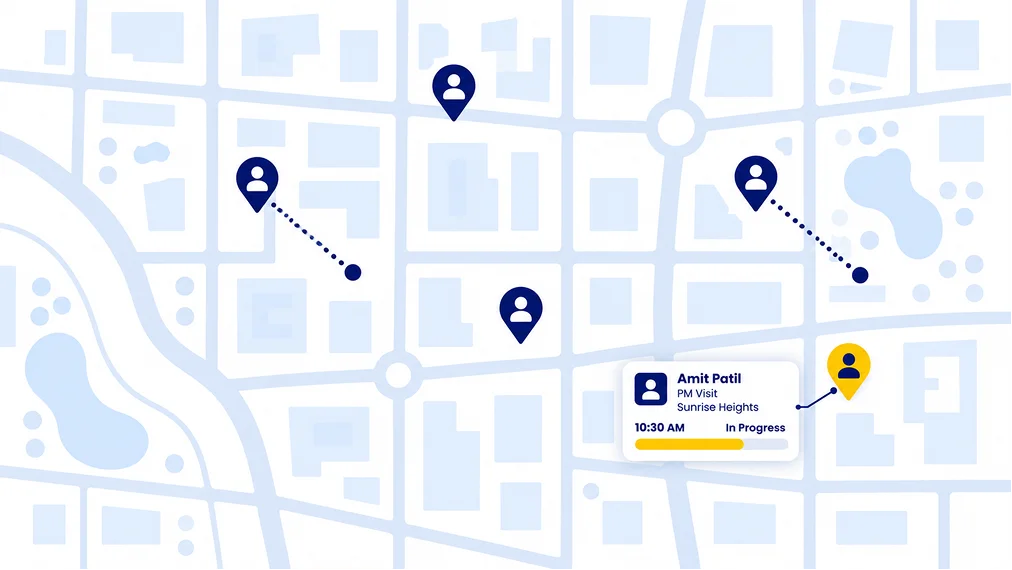
Live technician location and distance travelled on Android, configurable to your own SOP. Mark-in and mark-out are geo-tagged, so site arrival and attendance are recorded without a register at the gate or a phone call at eleven o'clock.
Trusted by Fastest-Growing Elevator Companies
Where each technician is now, on a map, with their assigned jobs for the day.
Captured automatically over the day. This is what most companies use to settle travel allowance without a paper claim and without an argument.
When a technician arrived at a site and when they left, with the location stamped. Attendance and site attendance become the same record rather than two.
Reported, assigned, on the way, on site, resolved. Visible as it happens rather than at the end of the day. These status names are configurable, so if your team already says something different, the system says it too.
Live location tracking is an Android capability. Apple restricts background location access far more tightly than Android does, so the live tracking view is not available on iPhones. If your technicians are on iOS, you get geo-tagged mark-in and mark-out but not a continuous live view. We would rather you knew that now than found it in week three.
Tracking also depends on the permissions the technician grants on their own device. If location permission is denied, the app still works and the job still closes. It simply will not report a position.
And it is entirely optional. Some companies run it for every technician every day. Others switch it off completely and use only mark-in and mark-out. It is a setting, not a condition of using the product.
Apple restricts background location access far more tightly than Android does, so on iPhones you get geo-tagged mark-in and mark-out but not a continuous live view.
If location permission is denied, the app still works and the job still closes. It simply will not report a position.
Some companies run it for every technician every day. Others switch it off completely and use only mark-in and mark-out. It is a setting, not a condition of using the product.
Elevator companies run very differently from one another, and a system that enforces one way of working gets abandoned by the ones it does not suit.
You decide who is tracked. Live location tracking is switched on per person, not for everybody by default. Some companies track their whole field team. Others track only the technicians who cover emergency callouts, and leave the rest on mark-in and mark-out alone. Only the people you enable are tracked live.
Geo-tagged mark-in can be required before a job can be started, or not. A photograph can be required before a job can be closed, or not. Job status names are configurable to your own vocabulary. Each of those is a setting your administrator controls.
Live location tracking is switched on per person, not for everybody by default. Only the people you enable are tracked live.
Can be required before a job can be started, or not.
A photograph can be required before a job can be closed, or not.
Configurable to your own vocabulary. Each of those is a setting your administrator controls.
The two questions that consume a dispatcher's day are answered on a screen. That time goes back into actually dispatching.
When a breakdown comes in, the person assigning it can see who is closest and who is free, rather than ringing three people to find out. See how the technician gets the assignment.
Distance is captured rather than claimed, so the monthly conversation about travel is a review rather than a disagreement.
A technician who marked in at a site was at that site. There is no separate attendance system to reconcile against.
"Route planning is the best part. I know which sites to visit before I even start my day. Service history of every lift is right there, no need to call office and ask."
Nitin Sataredkar
| Scenario | Before ElevatorPlus | With ElevatorPlus |
|---|---|---|
| Knowing where a technician is | ✕Phone call | ✓Live map, on Android |
| Site arrival | ✕Verbal, or a register at the gate | ✓Geo-tagged mark-in |
| Travel allowance | ✕Paper claims and logbooks | ✓Distance captured automatically |
| Attendance | ✕A separate system, or a punch machine | ✓Same record as site attendance |
| Assigning an emergency call | ✕Ring three people to find who is free | ✓Assign to whoever is nearest and available |
| Job progress | ✕End-of-day verbal report | ✓Status changes as they happen |
| Proof of attendance | ✕Contested at renewal | ✓Timestamped, geo-tagged, signed |
Does live location tracking work on iPhones?
No. Live technician location is an Android capability, because Apple restricts background location access more tightly. Geo-tagged mark-in and mark-out work on both.
Is tracking compulsory?
No. It is configurable to your own SOP. It can be on for everyone, on for field staff only, on during working hours only, or off entirely.
What if a technician denies location permission?
The app still works and the job still closes. It simply will not report a position.
Can we require a geo-tagged mark-in before a job can be started?
Yes, if you want to. It is a setting.
Does it record how far a technician travelled?
Yes, automatically over the day, which is what most companies use for travel allowance.
Can we choose who is tracked and who is not?
Yes. Live tracking is enabled per person rather than for everyone. You might track the technicians covering emergency callouts and leave the rest on mark-in and mark-out alone. Only the people you enable are tracked live.
Can we rename the job statuses?
Yes. Status names are configurable to whatever vocabulary your team already uses.
Does attendance need a separate system?
No. Mark-in and mark-out serve as both attendance and site attendance.
Thirty minutes, and we will walk you through a working day from the coordinator's side: assignments, arrivals, job status and the map, as it actually looks.
Book a Demo